
Why Your Family Emails End Up in Spam, and What LTC Teams Can Do About It

October 13, 2026 | MacGregor O'Blenes
You send an important update to families. Maybe it's an outbreak notice, a facility-wide policy update, an invitation to an upcoming event or your regular community newsletter. Then someone calls a few days later and says, “I never got that email.”
You check. It was sent. The address was correct. But there it is, sitting in their spam folder.
For long-term care teams, this means important information can be missed, families may assume they weren't informed, and your team may end up spending more time following up by phone.
Why do some emails end up in spam?
There are technical factors that affect whether an email reaches someone's inbox, including the reputation of the sender, email authentication and sending history. But there's another important factor that your team has much more control over: the email itself.
What you put in your subject line, what you write in the message, who you send it to and how recipients interact with your emails can all affect whether future messages make it to the inbox.
The good news is that there are some simple things your team can do.
Make your subject line specific, not dramatic
In long-term care, some messages really are urgent. But if every important message has a subject line filled with capital letters, exclamation marks and phrases like “URGENT” or “ACTION REQUIRED,” it can start to look less like an important update and more like the kinds of messages spam filters are designed to watch for. It also doesn't tell families very much.
Instead of URGENT!!! PLEASE READ IMMEDIATELY, try Outbreak update for {community name} families: October 12.
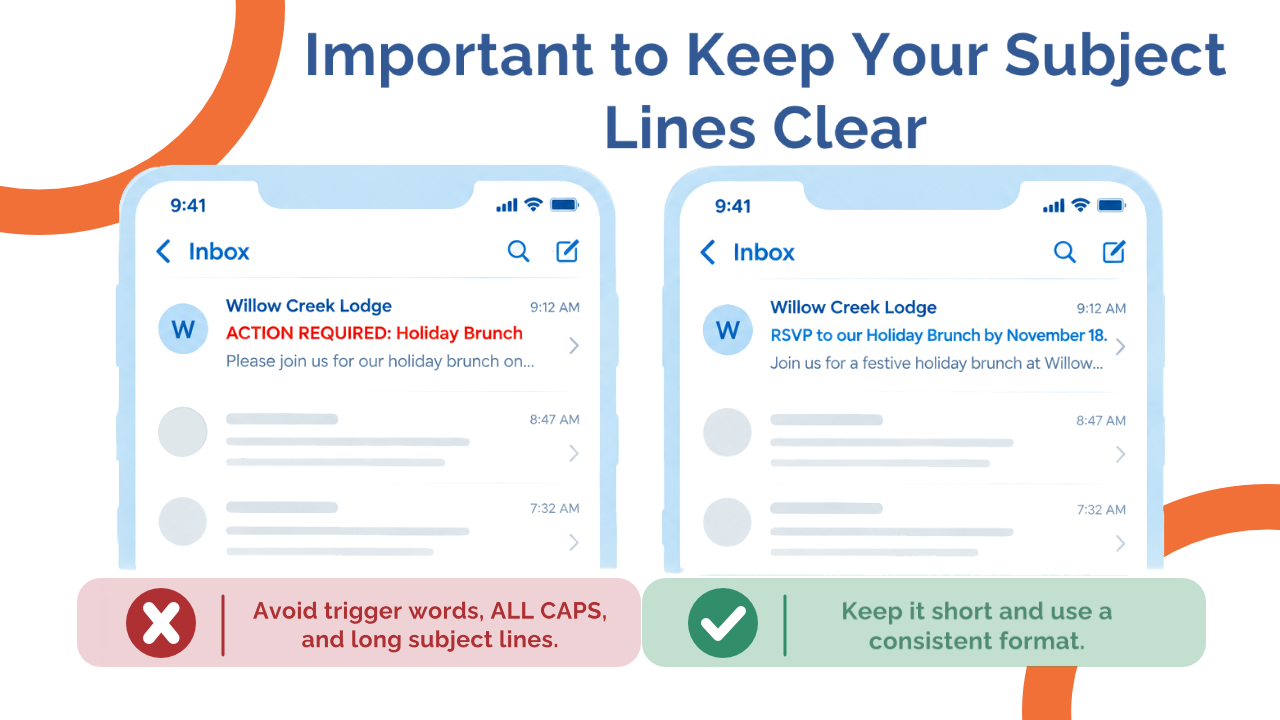
Instead of ACTION REQUIRED: Holiday Brunch, try RSVP to our Holiday Brunch by November 18.
Your subject line should tell the recipient what the email is about before they even open it. A good rule of thumb is to be specific before being urgent. If something truly requires immediate attention, say so, but give families enough context to understand what requires their attention rather than relying on “URGENT” to do all the work.
Give every email one clear job
Before you start writing, ask yourself three questions:
- Why am I sending this?
- Who actually needs to receive it?
- What do I want them to do after reading it?
Your email should answer those questions just as clearly for the recipient.
If the purpose is to communicate new visiting hours, lead with the new visiting hours. If you're inviting families to a town hall, tell them when it is and how to RSVP. If you're simply sharing information and no action is required, say that.
Try to avoid putting several unrelated requests into one email. If you're asking families to register for an event, complete a survey, read a policy update and download a document, there's a good chance the most important information will get lost.
For regular collections of news and updates, that's what your newsletter is for. For important communications, one email, one job is a useful rule to follow.
Put the important information first
You don't need a long introduction. Family members may be reading your message between meetings or quickly checking their phone. They shouldn't have to read three paragraphs before discovering why you've contacted them.
Instead of:
“Dear families, we hope you are doing well. As we continue to work hard to provide the best possible environment for our residents and families, we wanted to take this opportunity to share an important update with you…”
Get to the point:
“Beginning Monday, October 19, our visiting hours will change to…”
Keep the writing simple and human
An operational email doesn't need to look or sound like a marketing campaign. In fact, simpler is often better.
Use plain language, relatively short paragraphs and a tone families will recognize from your community. Avoid excessive ALL CAPS, exclamation marks and promotional phrases such as “Don't miss out!” or “Act now!”
Make your calls to action specific too. Instead of “Click here,” try “View the updated visiting hours.”
If you use AI to help draft an email, that's fine. But read the final message before sending it. Remove generic language, unnecessary introductions and anything that doesn't sound like your organization. AI can help you write the first draft. Your team should still own the final message.
Don't make an image or attachment do all the communicating
A beautiful poster isn't necessarily a good email. If all of the important information is contained in an image, recipients may have trouble reading it on a phone, and some email clients may block images by default. The same principle applies to attachments.
If you're attaching a PDF with an important update, summarize the essential information in the email itself. Families shouldn't have to download a document just to figure out why you've contacted them.
Images and attachments can support your message, not replace it.
Send the right message to the right people
Not every email needs to go to everyone. If an update only affects residents and families on one floor, sending it to the entire community may seem harmless. But over time, irrelevant emails can teach people that they don't need to pay attention to every message you send.
They stop opening. They delete without reading. Some may even mark messages as spam. That matters because email providers pay attention to how recipients interact with the messages they receive.
Before every mass communication, ask: Who actually needs this information? The more relevant your emails are, the more reason people have to keep opening them.
Help families tell their email provider they want your messages
Your families can help with deliverability too. When a new resident joins your community, consider making this part of your family onboarding process.
Ask family members to add your sending email address to their contacts. If they aren't seeing your emails, ask them to check their spam or junk folder. If they find one there, they should use the option provided by their email service to mark it “Not spam,” “Not junk” or “Safe.”
You could include a simple message like this in your onboarding materials:
Not seeing our emails? Add [email address] to your contacts to help make sure our updates reach your inbox. If you find one of our messages in your spam or junk folder, please mark it as “Not spam,” “Not junk” or “Safe.”
Keep your contact list healthy
People change email addresses. Family contacts change. Residents leave the community.
If you repeatedly send messages to addresses that bounce or are no longer active, that can affect your sending reputation over time. Review your mass communication lists regularly and remove addresses that are no longer valid.
What about the technical side?
Even a perfectly written email can end up in spam for technical reasons. Email providers also look at whether they trust the sender. Your sending history, authentication, bounced emails and changes in sending volume can all affect whether messages reach the inbox.
If you're starting with a new email domain or sending address, suddenly sending a large volume of emails can raise red flags. Building your sending volume gradually helps establish a positive sending reputation. This is often referred to as warming up an email or domain.
There are also technical authentication measures that help email providers verify that a message really came from the organization it claims to be from. If your organization manages its own mass email system, your IT team or email provider should be able to confirm that these pieces are properly set up.
Using Engage+? This part is already taken care of.
Engage+ manages the technical sending infrastructure behind your mass communications, including authentication and sender reputation. That means your team doesn't have to manage the technical side of warming and maintaining the sending infrastructure themselves.
Instead, you can focus on the part you control every time you hit Send: what you're saying, who you're sending it to and whether your message is clear, relevant and worth opening.
Before sending your next mass email, test it
Even when you're following good practices, it's worth checking an important email before sending it to your entire community. There are free tools that can help identify potential deliverability issues in your subject line, content and email setup before you hit Send.
We've put together an LTC Mass Email Pre-Send Checklist to make that process easier. It includes a quick pre-send checklist for your subject line, message and audience, plus step-by-step instructions for testing your email before it goes out.
Remember, you don't need to fix everything at once. Start with your subject lines and email body, since that's what your team controls every day.